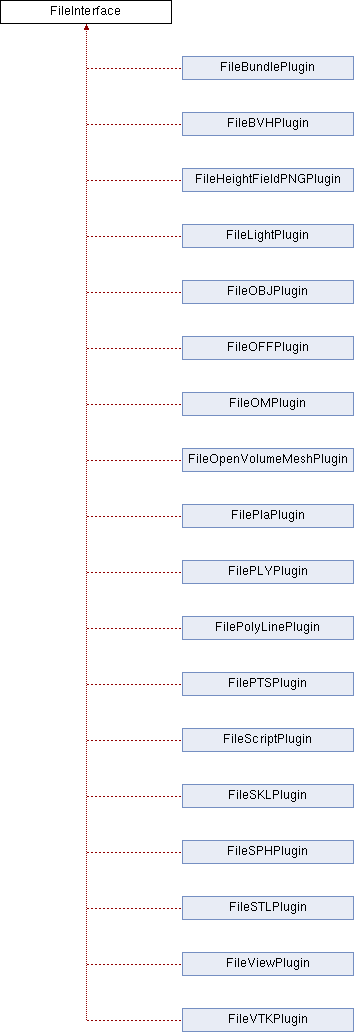
Interface class for file handling. More...
#include <OpenFlipper/BasePlugin/FileInterface.hh>
Public Member Functions | |
Widgets | |
| virtual | ~FileInterface () |
| Destructor. | |
| virtual QWidget * | saveOptionsWidget (QString _currentFilter)=0 |
| virtual QWidget * | loadOptionsWidget (QString _currentFilter)=0 |
Supported types | |
| virtual DataType | supportedType ()=0 |
| Return your supported object type( e.g. DATA_TRIANGLE_MESH ) More... | |
| virtual QString | getLoadFilters ()=0 |
| virtual QString | getSaveFilters ()=0 |
Load Save Implementation | |
| virtual bool | saveObject (int _id, QString _filename)=0 |
| Save an object from the given file. More... | |
| virtual bool | saveObjects (IdList _ids, QString _filename) |
| Save multiple objects to one file. More... | |
| virtual void | openedFile (int _id) |
| This signal has to be emitted if an object has been loaded from a file. More... | |
| virtual int | loadObject (QString _filename)=0 |
| Load an object from the given file. More... | |
| virtual int | loadObject (QString _filename, DataType _type) |
| Load an object from the given file. More... | |
Detailed Description
Interface class for file handling.
Detailed description
Loading and saving of files in OpenFlipper is handled via the file plugins. These have to implement this class.
Definition at line 63 of file FileInterface.hh.
Member Function Documentation
◆ getLoadFilters()
|
pure virtual |
Return the Qt Filters for File dialogs when loading files (e.g. "Off files ( *.off )" )
Implemented in FileVTKPlugin, FileOBJPlugin, FileOFFPlugin, FilePTSPlugin, FileBundlePlugin, FileOpenVolumeMeshPlugin, FilePLYPlugin, FileSTLPlugin, FileOMPlugin, FileBVHPlugin, FilePolyLinePlugin, FileSKLPlugin, FileSPHPlugin, FilePlaPlugin, FileHeightFieldPNGPlugin, FileViewPlugin, FileScriptPlugin, and FileLightPlugin.
◆ getSaveFilters()
|
pure virtual |
Get the Qt Filters for Filedialogs when saving files (e.g. "Off files ( *.off )" )
Implemented in FileVTKPlugin, FileOBJPlugin, FileOFFPlugin, FilePTSPlugin, FileBundlePlugin, FileOpenVolumeMeshPlugin, FilePLYPlugin, FileSTLPlugin, FileOMPlugin, FileBVHPlugin, FilePolyLinePlugin, FileSKLPlugin, FileSPHPlugin, FilePlaPlugin, FileHeightFieldPNGPlugin, FileViewPlugin, FileScriptPlugin, and FileLightPlugin.
◆ loadObject [1/2]
|
pure virtualslot |
Load an object from the given file.
The Core will call this slot if you should load a file. The core will check if you support the given file type depending on the provided filters and dataTypes ( see supportedType and getLoadFilters )
If loading fails, you have to return -1. If you created an empty object and then your load procedure fails, you should remove the newly generated object.
if you just opened a file and did not create any object, return 0 here, telling the core that it was successfully loaded but no new object has been created!
◆ loadObject [2/2]
|
inlinevirtualslot |
Load an object from the given file.
The Core will call this slot if you should load a file. The core will check if you support the given file type depending on the provided filters and dataTypes ( see supportedType and getLoadFilters )
if you just opened a file and did not create any object, return 0 here, telling the core that it was successfully loaded but no new object has been created!
If loading fails, you have to return -1. If you created an empty object and then your load procedure fails, you should remove the newly generated object.
If the Plugin is able to open the file in different DataTypes one of these DataTypes can be forced with this function.
This forcing is used for example by the recent files function for choosing between poly or triangle mesh loading.
Definition at line 179 of file FileInterface.hh.
◆ loadOptionsWidget()
|
pure virtual |
You can provide a special widget showing options for loading your file types depending on the current filter
_currentFilter: one filter from loadFilters
Return 0 when you don't need one
Implemented in FileVTKPlugin, FileOBJPlugin, FileOFFPlugin, FilePTSPlugin, FileOpenVolumeMeshPlugin, FileBundlePlugin, FilePLYPlugin, FileSTLPlugin, FileOMPlugin, FileBVHPlugin, FilePolyLinePlugin, FileSKLPlugin, FileSPHPlugin, FilePlaPlugin, FileHeightFieldPNGPlugin, FileScriptPlugin, FileViewPlugin, and FileLightPlugin.
◆ openedFile
|
inlinevirtualsignal |
This signal has to be emitted if an object has been loaded from a file.
Every time a new object is added to the scene from a file, this signal has to be emitted. Emit this signal once each time a file has been completely processed.
This signal can be called from any thread.
- Parameters
-
_id Id of the new object
Definition at line 138 of file FileInterface.hh.
◆ saveObject()
|
pure virtual |
◆ saveObjects()
|
inlinevirtual |
Save multiple objects to one file.
The Core will call this slot if the user wants to save multiple files in one file. The core will check if you support the given object depending on the provided dataTypes ( see supportedType ). Additionally to the filename you get ids of the objects to save
Definition at line 197 of file FileInterface.hh.
◆ saveOptionsWidget()
|
pure virtual |
You can provide a special widget showing options for saving your file types depending on the current filter
_currentFilter: one filter from saveFilters
Return 0 when you don't need one
Implemented in FileVTKPlugin, FileOBJPlugin, FileOFFPlugin, FilePTSPlugin, FileOpenVolumeMeshPlugin, FileBundlePlugin, FilePLYPlugin, FileSTLPlugin, FileOMPlugin, FileBVHPlugin, FilePolyLinePlugin, FileSKLPlugin, FileSPHPlugin, FilePlaPlugin, FileHeightFieldPNGPlugin, FileScriptPlugin, FileViewPlugin, and FileLightPlugin.
◆ supportedType()
|
pure virtual |
Return your supported object type( e.g. DATA_TRIANGLE_MESH )
If you support multiple DataTypes you can combine them bitwise here. The function is used from the load and save code to check if your plugin can handle an object of a given dataType.
Implemented in FileVTKPlugin, FileOBJPlugin, FileOFFPlugin, FilePTSPlugin, FileOpenVolumeMeshPlugin, FileBundlePlugin, FilePLYPlugin, FileSTLPlugin, FileOMPlugin, FileBVHPlugin, FilePolyLinePlugin, FileSKLPlugin, FileSPHPlugin, FilePlaPlugin, FileHeightFieldPNGPlugin, FileViewPlugin, FileScriptPlugin, and FileLightPlugin.
The documentation for this class was generated from the following file:
- OpenFlipper/BasePlugin/FileInterface.hh